


Backgammon - Board Game
4.55.51K Reviews
App Specs
- Version
- 1.27.0
- Updated On
- License
- Free
- Downloads
- 10,000,000+
- Developer
- Easybrain
- Categories
- Board
- Platform
- Android, iOS
Screenshots



 Analysis by AppCompare
I find mobile backgammon most useful when it fits a small, ordinary gap in the day: a quiet few minutes at home, a break between tasks, or a chance to revisit a familiar game without setting up a physical board. Backgammon - Board Game is a free board game from Easybrain, and its appeal is straightforward: it puts the traditional contest of dice, movement and risk on a phone. I’d consider it if you already enjoy backgammon or want a convenient way to get acquainted with it, though the best experience depends on whether its play options and presentation suit what you’re looking for.
Where players may get stuck
Backgammon is easy to recognize but not always easy to play well. A new player can understand that pieces travel around the board and still find it hard to decide which move is safest, when to take a risk, or how a roll changes the plan. That is the main hurdle here: the app can make a game available quickly, but the strategic choices still take practice. I’d give myself time to learn rather than treating an early loss as a sign that the game is too complicated.
There is also a practical difference between wanting a relaxed solo game and wanting a particular kind of match with another person. The published description is brief, so I would check the options shown in the app before counting on a specific opponent type or mode. If you are installing it mainly to play with a friend, confirm that the available way to start a match suits both of you before making plans around it.
Setup checks before a first match
The game is rated for Everyone, and the current version is 1.23.0, with Android support beginning at version 7.0. Before installing, I’d check that the device meets that minimum and has enough room for another game. If the store page offers an update after installation, using the current release can help avoid problems caused by an older build, though it cannot fix every device or connection issue.
The game is free to download, with in-app purchases listed at $14.99 per item. I’d treat that as a reason to pay attention to purchase prompts, not as a requirement to spend before trying the game. If you are setting it up for a child or sharing a device, it is sensible to review the device’s purchase controls in advance. That is a general precaution for mobile games and helps avoid an accidental checkout while exploring menus.
The Classic Game, Reimagined
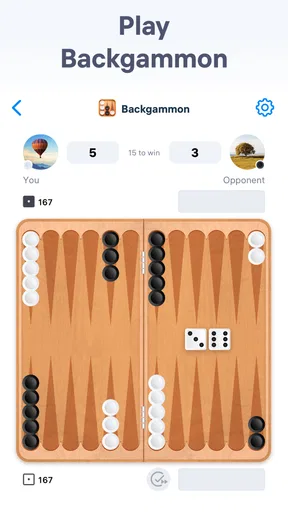
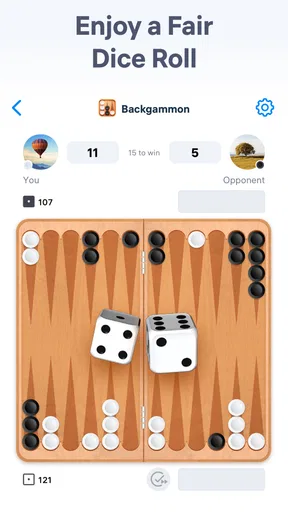
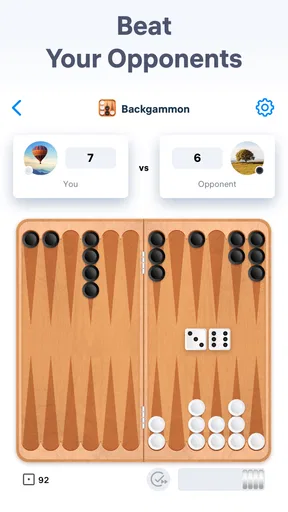
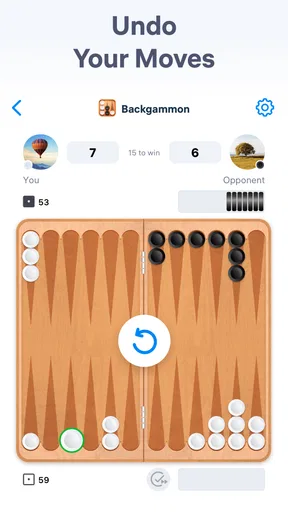
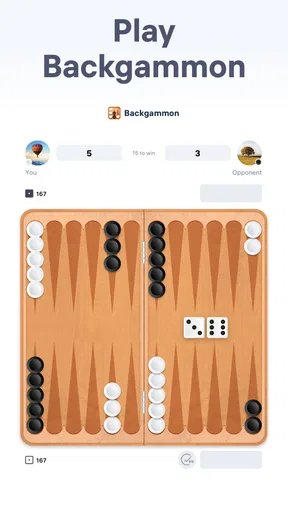
First off, let's talk about the set-up. When you fire up Backgammon - Board Game, you're greeted with a sleek and intuitive interface. The design is clean and user-friendly, making it easy for both newcomers and seasoned players to dive right in. The game board itself is beautifully rendered, with crisp graphics that mimic the texture and feel of a real backgammon board. It's like having a portable board game in your pocket that you can whip out anytime you're in the mood for a challenge.
Gameplay Experience
Now, onto the gameplay. The app offers several modes to keep things interesting. Whether you want to play against AI or face off against friends online, there's an option for you. The AI is surprisingly sharp, offering a decent challenge for those who think they’ve mastered the game. If you’re like me and enjoy a bit of competition, the online multiplayer mode is a real treat. You can easily connect with players from around the world, testing your skills and strategies against real opponents.
Worth Reading Before You Choose

Flipboard Shows What News Apps Must Do Beyond the Feed

Switching to Android Auto Means Rethinking Your Driving Routine

Google Calendar Makes a Crowded Week Easier to Manage

Ludo King Makes the Most of the Minutes Between Plans

Baby Panda World Brings Quick Play to Modern Phones, but Its Game Library Feels Busy

ESPN’s Live Game View Makes Following Close Games Easier
One feature I particularly enjoyed is the ability to customize your board and pieces. You can select different themes to keep things fresh and personalize your game to your liking. It's a small touch, but it adds a level of engagement that keeps you coming back for more.
Making the most of each session
For a short session, I’d focus on one decision at a time rather than trying to memorize every possible strategy. After each roll, pause to notice which pieces become exposed and whether a move gives you a safer route forward. This simple habit makes a casual game feel more useful as practice: you begin to recognize patterns instead of moving pieces by instinct alone. It also helps keep the game approachable when you only have a few minutes.
Customization is most valuable when it improves comfort, not just appearance. If a board theme makes the pieces easier for you to distinguish at a glance, use it; if you prefer the standard look, there is no need to change anything. I’d make any visual choices before a focused match, so I’m not interrupting the flow to browse options. These small decisions matter more on a phone than on a tabletop, where the board stays in view without menu navigation.
Learning Curve
If you're new to backgammon, fear not! The app includes a handy tutorial mode that walks you through the basics of the game. It’s detailed enough to get you up to speed without overwhelming you with too much information at once. After a few rounds, you'll feel confident enough to take on tougher opponents. The tutorials are interactive, which makes learning the game a breeze.
The app also includes a handy guide to help you understand the rules and strategies. If you're ever stuck or need to brush up on your skills, it's just a tap away. This makes the app accessible to players of all skill levels, whether you're a beginner or a backgammon aficionado.
Recovering the flow when a game is interrupted
Mobile play is convenient, but it can be interrupted by a call, a notification or simply needing to put the phone away. If that happens, I’d reopen the game and check the board state carefully before making the next move; don’t assume you remember the exact roll or which pieces were exposed. If the match does not appear to continue as expected, returning to the main screen and choosing an available game again is a sensible first check. Avoid tapping quickly through prompts when you are unsure what they mean.
For online play, a dropped or unstable connection can make a match feel less smooth than a solo session. I’d first check that the phone has a usable connection, then try again when the signal is steady. If the issue happens only with one particular connection, switching between available Wi-Fi or mobile data is a reasonable general troubleshooting step. It is not a guarantee, but it helps separate a local connection problem from a game preference or rules question.
Sound and Visuals
Let’s not forget about the sound and visuals. The game features soothing background music that enhances the gameplay experience without being distracting. The sound effects are crisp and add realism to the game. You can hear the dice roll and the pieces move, which adds to the immersion.
Visually, the game is a treat. The graphics are sharp, and the animations are smooth, making for an enjoyable visual experience. The color schemes are easy on the eyes, ensuring that long gaming sessions remain comfortable.
When the app may not be the cause
If a board looks crowded or a move seems unavailable, I’d check the rules and the current dice result before assuming something has gone wrong. Backgammon’s legal moves can be less obvious to beginners than the basic movement suggests, especially when pieces are blocked. Re-reading the in-app guide can be more helpful than repeatedly tapping the same piece. That is a useful distinction: sometimes the confusing moment is part of learning the game rather than a technical fault.
Likewise, a slow response can come from the phone or network rather than the game itself. Closing other demanding apps, checking the connection and reopening the game are sensible basic steps if performance changes unexpectedly. If the same issue keeps returning, make a note of what was happening—such as whether it occurred online or during a solo game—before deciding what to try next. That observation can keep troubleshooting focused instead of turning into random changes.
Compared with a physical board, the mobile version is easier to carry and start, but it cannot reproduce the social feel of sitting across from another player or the freedom to arrange a match on your own terms. Compared with a very minimal digital board, its presentation and the options described above make it feel more like a packaged game, while menus and visual choices add a little extra to navigate. I’d choose the phone version for quick practice and convenience, and a real board or a different app if face-to-face play or a specific match setup matters more.
Final Thoughts
All in all, Backgammon - Board Game is a fantastic way to enjoy a classic game on your mobile device. It combines traditional gameplay with modern features, making it a must-have for board game enthusiasts. Whether you’re looking to kill some time or seriously hone your skills, this app has something to offer.
Its popularity is easy to understand: it has a 4.6 average from around 181,000 ratings, and it has passed 10 million installs. Those figures suggest that plenty of people have tried it, but they do not tell me whether every part of the experience will suit you. I’d judge it by the kind of backgammon you want: casual solo play, practice, or competition with others. The app is best for someone happy to learn through play and use a phone as a convenient board; anyone seeking a guaranteed specific multiplayer arrangement should check the available choices first.
So, if you haven't already, give Backgammon - Board Game a download and see for yourself why it's a staple in the world of mobile board games. Happy playing!
Practical verdict
I’d recommend it to people who want backgammon close at hand, especially beginners who can use the guide and experienced players who enjoy fitting a match into a spare moment. The game is free, carries an Everyone age rating, and comes from Easybrain; its release date is December 24, 2021. Those details make it easy to identify what you are installing, while the decision to keep it comes down to whether its play experience feels comfortable on your device.
For an everyday example, imagine having a short wait before an appointment. A quick game gives you something more engaging than scrolling, and noticing one exposed piece or a better route becomes a small bit of practice. But if you want a long, uninterrupted session with a friend beside you, I’d reach for a physical board instead. Backgammon’s luck and strategy are part of its charm, yet a phone is still a personal screen, not a shared table.
One final trade-off is that a digital opponent or online match can make it easier to start, but neither replaces choosing your own pace and opponent in person. I would install it for convenience and regular practice, keep purchases in mind when browsing, and use the in-game guide whenever a move is unclear. That is the practical case for this board game: a handy way to play, with the usual limits of mobile sessions rather than a substitute for every kind of backgammon night.
Pros
- Smooth and intuitive interface.
- Multiple difficulty levels available.
- Online multiplayer mode included.
- Customizable board and pieces.
- Detailed tutorials for beginners.
Cons
- Occasional connectivity issues.
- In-app ads can be intrusive.
- Limited themes without purchase.
- Some advanced features require subscription.
- No offline multiplayer option.
FAQs for Backgammon - Board Game
What are the main features of Backgammon - Board Game?
Backgammon - Board Game offers a classic experience with modern enhancements. It includes multiple difficulty levels, online multiplayer, and a user-friendly interface. Players can enjoy various themes, track their statistics, and even participate in global tournaments. The app also provides tutorials for beginners and customizable game settings for a personalized experience.
Is the Backgammon - Board Game suitable for beginners?
Yes, the app is designed to cater to both beginners and seasoned players. It features a comprehensive tutorial mode that guides new players through the rules and strategies of backgammon. Additionally, the app offers adjustable difficulty levels, allowing beginners to gradually improve their skills before competing with more advanced opponents.
Does the app require an internet connection to play?
Backgammon - Board Game offers both online and offline modes. While an internet connection is necessary for playing against online opponents, the app also includes an offline mode. This mode allows players to compete against the AI, making it convenient for those without constant internet access or who prefer solo play.
How does the multiplayer feature work in Backgammon - Board Game?
The app's multiplayer feature lets you compete against friends or random opponents from around the world. You can invite friends directly or join random matches. The app includes a chat function for interaction and supports leaderboards to track your global ranking. It ensures a smooth experience with real-time gameplay and minimal lag.
Are there any in-app purchases or ads in Backgammon - Board Game?
Backgammon - Board Game is free to download, but it may include in-app purchases for premium features, such as exclusive themes or ad removal. While ads might appear during play, they are typically non-intrusive. Players have the option to make a one-time purchase to remove ads and enhance their gaming experience.


